Every backflow job.
From schedule to payment. Backflow Testing Software
One place for the whole job. Schedule tests, give technicians their routes, record readings on a phone, prepare and send approved reports, and keep invoices tied to the work. Leave the second shift of paperwork behind.
Built for the owner in the field and the office keeping every job moving.
The $300/month plan includes setup assistance and up to five staff logins.
Actual platform footage with fictional records and a training report.
The entire job.
One connected record.
Backflow work is more than filling out a report. See how a customer, an assembly, a field test, an approved form, and an invoice stay connected from start to finish.
- Plan
- Test
- Review
- Invoice
- Submit
-
1 Plan the work and the route
Keep customers, service locations, and assemblies together. Schedule the test, assign a technician and gauge, and put the stop on a route.
The field team knows where to go and which device needs testing.
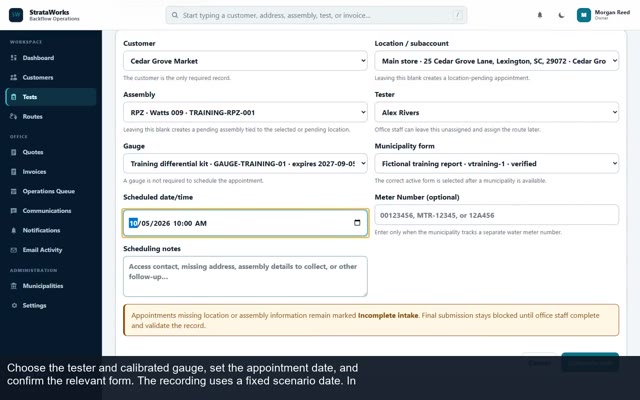
Schedule a test with the job details in view. -
2 Record the test in the field
Open assigned work on a phone, enter readings against the right assembly, add notes or photos when needed, and save a draft before sending it for office review.
Readings and context reach the office with the job.
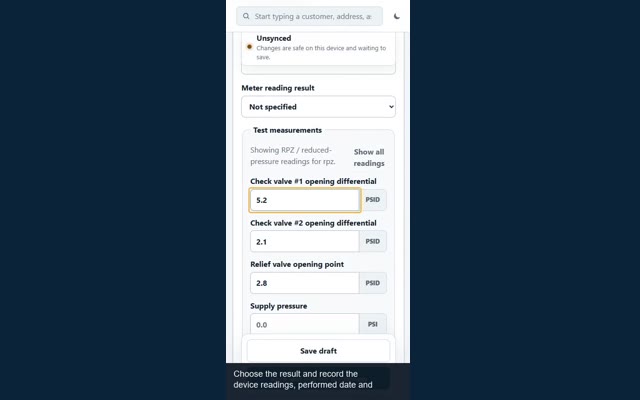
Field testing fits a phone-sized screen. -
3 Turn readings into a reviewed report
Office staff review the submitted test, check the configured authority form, and approve the resulting PDF. The customer, assembly, tester, and readings remain tied to the record.
Less copying the same readings onto another form.
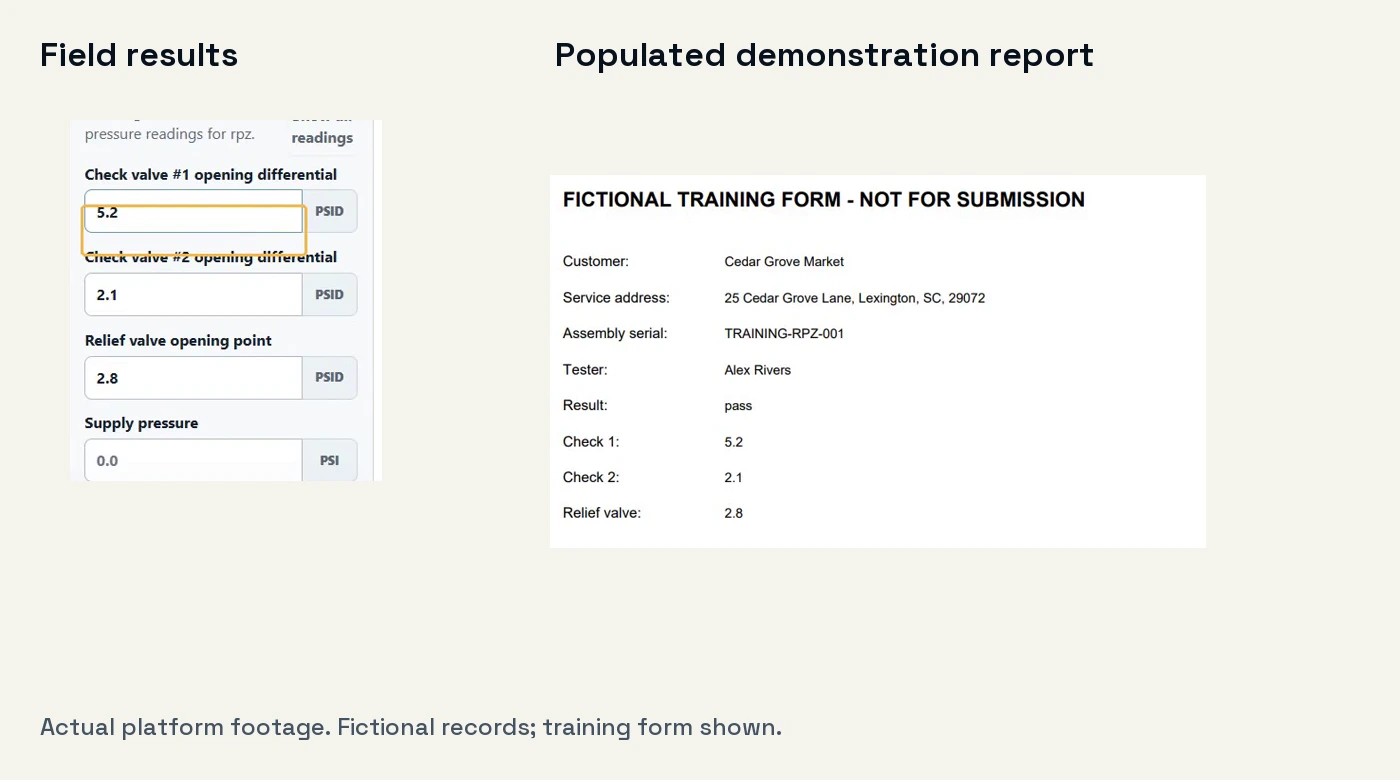
Illustrative training form. Live forms require mapping and review. -
4 Invoice the work and see what is owed
Create an invoice linked to the customer, location, and approved test. Issue it, track its balance, and record payment without losing the path back to the completed job.
The office can see the work behind every balance.
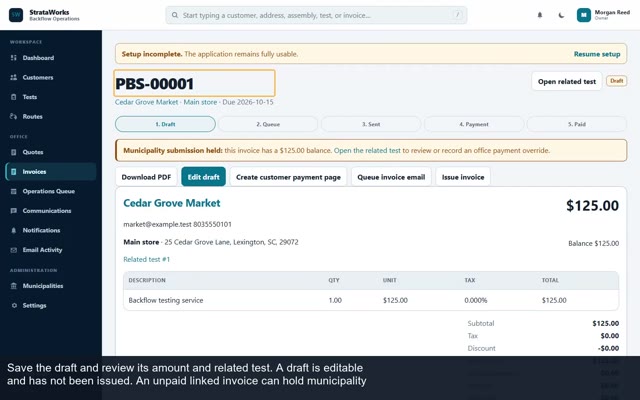
Invoice and test history stay connected. -
5 Prepare and send the approved form
Eligible reports move through a municipality submission queue. After the required review and payment checks, approved reports can be emailed through your configured submission workflow, with delivery history kept alongside the job.
A sent email is visible; the authority's acceptance still needs confirmation.
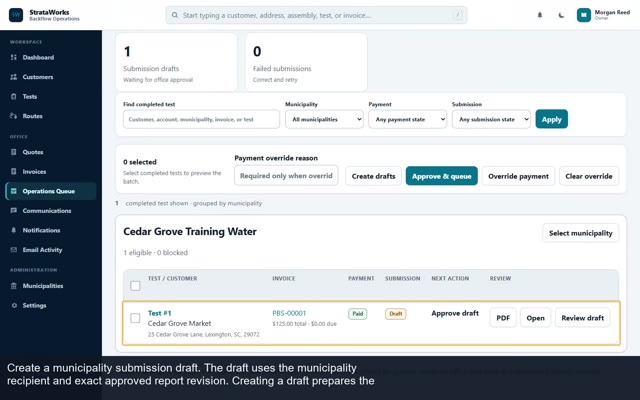
Review the draft before it enters the email queue.
Screens show the actual platform with fictional demonstration records. Municipality forms must be configured and checked before live use.
Ready to put the whole workflow in one place?
See the $300 planThe next job starts
with what you know.
Keep the work around each test in the same workspace, so the next appointment does not begin with a search through paper, inboxes, and spreadsheets.
Customer and assembly history
Find service locations, account details, prior tests, invoices, and assembly records when a customer calls or a device comes due.
Renewal follow-up
Use device due dates to prepare monthly renewal reminders. Review and approve batches before messages are queued.
A practical move from your old system
Bring in customers through the verified Jobber CSV import workflow. We scope other imports and new municipality forms with you before setup.
Available for teams nationwide. Add municipalities and custom forms, then confirm each authority's current form, recipient, and accepted submission method. Portal requirements need a separate review. How report submission works.
Put the cost beside
the time you spend.
How much of your evening goes into filling forms and organizing completed work? For $300/month, give your team one connected workspace for scheduling, field testing, configured reports, invoicing, and email submissions, with help getting set up.
Want to talk with us first?StrataWorks Backflow Operations
$300per month
Includes up to five staff logins.
Lock in the $300 monthly base rate for 60 months while your subscription stays continuously active.
Limited spots remaining at the $300 rate.
- Customer, location, and assembly records
- Scheduling, routing, field testing, and test history
- Custom municipality forms and configured email submissions
- Invoicing, receivables, and payment workflows
- Office and field roles
- Setup assistance and the tutorial library
Online signup is opening soon. Contact us to arrange your setup.
Ask to lock in $300Checkout opens in a new tab. After payment, return here and send your company setup details.
Standard setup is ready within three business days after payment and completed setup details.
Your first monthly payment is collected at checkout. Applicable tax is calculated by Stripe. Custom imports, new forms, and optional provider services are scoped separately before work begins.
What happens after you subscribe?
- 1
Send your setup details
Company information, staff email addresses, municipalities, and your current data source. No consultation is required for standard setup.
- 2
We prepare your workspace
We verify the subscription and configure your company access. Standard setup takes up to three business days once payment and details are complete.
- 3
Sign in and start working
Look for your access email. Follow the setup checklist and video guides, and contact us if you need help.
Know what
you’re signing up for.
Do I need to book a demo first?
No. Start with the short video above. If you’d like to see the workflow for your business in more detail, a personal walkthrough is available.
Will my account be ready immediately?
Your workspace is prepared after payment and completed setup details. Standard setup is ready within three business days. Custom migration or new form requirements are reviewed separately.
Which staff can use the five logins?
The plan includes up to five individual staff accounts for your office and field team. Let us know who needs access when you send the setup form.
How does the 60-month rate guarantee work?
The $300 monthly base subscription rate stays the same for 60 months from signup while your subscription remains continuously active. The guarantee ends if you cancel. Applicable tax and separately scoped services are additional.
Does the platform submit the report for me?
Yes. Eligible approved reports are sent through your configured email submission workflow, with the report and submission history kept with the job. Approval, payment rules, a completed report, and a configured recipient determine when a report can be sent. Sending does not confirm acceptance by the authority.
Can I add my own municipalities and custom forms?
Yes. Teams nationwide can add municipalities and custom forms through the app, even when a form is not in our supplied library. Form fields need to be mapped and checked before live use. Confirm the current form, recipient, and accepted submission method with the authority. Read the submission guide.
What if an authority requires a portal?
The submission workflow described here is email. If a provider requires a portal or another method, check that requirement with us before subscribing. Ask about your workflow.
Can I bring data from another system?
A Jobber customer CSV import workflow is verified. Tell us which records you want to move. Other sources and more extensive migrations need their own agreed scope.
How do invoices and payments work?
The platform keeps invoices, receivables, and payment history with the work. Optional payment-provider connections are configured for your business.
How do I get help or discuss billing?
Email james@strataworks.tech or call (803) 386-7728. Subscription terms and billing details are provided at checkout; contact us with questions before purchasing.
Take a closer look.
A question before
you get started?
Ask about your forms, request setup, or arrange an optional demo. Tell us what your business needs and we’ll follow up by email.